
The SSO ID Rajasthan is a Single Sign-On (SSO) system introduced by the Government of Rajasthan to provide citizens with a convenient and secure way to access multiple government services. With just one unique set of login credentials, users can seamlessly log in to a wide range of online portals, saving time and effort. This digital initiative not only simplifies the process of availing government schemes but also reduces the hassle of maintaining multiple usernames and passwords for different platforms. In this blog post, we will cover everything about SSO, SSO Login, SSO ID Login, benefits, and the step-by-step registration process. So, let’s dive in and explore the details.
What is the SSO Rajasthan Portal?
The SSO Rajasthan Portal is a government portal launched by the Rajasthan government. We can access all Rajasthan services through this portal, eliminating the need to visit any office. We simply visit the SSO Portal and log in with our SSO ID to access all services.
What is SSO ID Rajasthan?
SSO ID (Single Sign-On Identity) is a digital identity system launched by the Government of Rajasthan. Its primary objective is to provide residents of the state with a simple and secure way to access various government services on a single platform.
Through SSO ID, users can access various government services such as e-Mitra, Bhamashah, Rajasthan State Pollution Control Board (RSPCB), Public Health Engineering Department (PHED), and many others. They don’t need to log in multiple times.
To obtain an SSO ID, users must register on the official website of the SSO Rajasthan Portal. During registration, they must provide their personal details, such as their name, email ID, or mobile number. Upon completing the registration process, users receive a unique SSO ID and password, which they can use for various services.
SSO ID Rajasthan Overview
| Feature | Description |
| Post | SSO ID |
| Purpose | Provides a single login system for accessing various government services in Rajasthan. |
| State | Rajasthan |
| Services Offered | Employment, education, health, finance, land records, transport, police, revenue, social welfare, agriculture, and many more essential services. |
| Registration | Users can register using their Aadhaar number, Jan Aadhaar, Bhamashah ID, or other required details. |
| Authentication | Verifies user identity through OTP, biometric authentication, or digital certificates to ensure secure login. |
| Dashboard | Provides a personalized dashboard for managing multiple services and accessing important information in one place. |
| Helpline | Offers 24/7 support through the dedicated helpline number: 1800 180 6565. |
| Security | Employs robust encryption and security measures to protect user data and prevent unauthorized access. |
| Accessibility | Available via web portal, mobile application, and Common Service Centers (CSCs) across Rajasthan. |
| Updates | Regularly updated to incorporate newly launched services, schemes, and digital features. |
| Official Website | sso.rajasthan.gov.in |
Who Launched the SSO ID Rajasthan?
The SSO ID Rajasthan was launched by the Rajasthan State Electronics Development Corporation (RSDC) under the guidance of the Rajasthan Information Technology Department. The main Objective of this initiative is part of the government’s mission to digitize and streamline public services, ensuring easier access for citizens across the state.
How Can I Reset My SSO ID Password?
If you’ve forgotten your SSO password, you can reset it within minutes by following these simple steps:
- Visit the SSO login page: Open sso.rajasthan.gov.in and click on “Login.”
- Click on “Forgot Password”: You will find this option below the login form.
- Select a recovery method: Choose any one of the following:
- Registered mobile number
- Registered email ID
- Aadhaar number
- Enter the OTP: An OTP will be sent to your selected option. Enter it on the verification screen.
- Create a new password: After OTP verification, set a new password and confirm it by entering it again.
- Log in again: Return to the login page and sign in using your new password.
Note: Use a strong password that is secure but easy for you to remember.
How to Recover Forgotten SSO ID?
If you forget your SSO ID, you can easily retrieve it using your registered information. Follow these simple steps:
- Visit the login page: Go to sso.rajasthan.gov.in and click on “Login.”
- Click on “Forgot SSOID”: You’ll find this option just below the login form.
- Select a recovery option: Choose any one of the following:
- Registered mobile number
- Email address
- Aadhaar number
- Enter your details: For example, if you select the mobile number option, enter your registered number and click “Submit.”
- Verify with OTP: An OTP will be sent to your selected contact method. Enter it to confirm.
- View your SSO ID: Once the OTP is verified, your registered SSO ID will be displayed on the screen.
Key Advantages of SSO ID Rajasthan
The SSO ID Rajasthan provides a wide range of advantages for both citizens and the government.
For Citizens:
- Convenience: Access multiple government services with a single login, avoiding the hassle of managing different usernames and passwords.
- Efficiency: Save time and effort as many services and applications can be completed online without lengthy paperwork or visits to offices.
- Security: Strong authentication and data protection measures safeguard user information, ensuring privacy and confidentiality.
- Accessibility: A user-friendly platform designed to make government services easily available through the web, mobile, and service centers.
For the Government:
- Better Service Delivery: Streamlined digital processes enhance the delivery of services, reducing delays and administrative burdens.
- Cost Savings: Minimizes expenses linked to manual paperwork, physical records, and repetitive data entry.
- Data-Driven Insights: Provides valuable analytics for enhancing service quality, planning, and policymaking.
- Transparency & Accountability: Makes services more open and accessible, building trust between citizens and government agencies.
How to Combine Multiple SSO IDs into One Account?
Sometimes, you may accidentally create more than one SSO ID. Having multiple accounts can lead to confusion and issues, so it’s best to merge them into a single ID. Here’s how you can do it:
- Log in to the SSO Portal: Sign in using the SSO ID you want to keep active.
- Open the Help or Support section: From the dashboard, find the Help, Contact, or Support option, usually available at the bottom of the website.
- Submit a merge request: Contact the SSO support team through the support form or email and clearly mention:
- The SSO ID you wish to retain
- The other SSO ID(s) you want to merge
- Upload identity proof: You may be asked to provide documents such as your Aadhaar card or any valid ID to confirm that all accounts belong to you.
- Verification process: The technical team will review your details and verify your request.
- Receive confirmation: After successful verification, your accounts will be merged, and all your data and services will be accessible under one single SSO ID.
Services Provided by SSO ID Rajasthan
The SSO ID Rajasthan Single Sign-On (SSO) ID grants citizens access to a diverse range of online services across multiple sectors.
Government Services
- Employment: Job applications, status tracking, and notifications.
- Education: Admissions, scholarships, exam results, and related services.
- Health: e-Health records, government health schemes, and online medical appointments.
- Finance: Bhamashah card, e-Mitra services, banking correspondence, and bill payments.
- Land Records: Land registration, mutation, and land-use changes.
- Transport: Vehicle registration, driving license, permits, and transport services.
- Police: Online FIR registration, complaint tracking, and e-pass facilities.
- Revenue: Property tax, land revenue, and other revenue-related services.
- Social Welfare: Pensions, welfare schemes, and social benefits.
- Agriculture: Agricultural loans, subsidies, schemes, and farmer support services.
Other Services
- e-Governance: Access to various government portals and citizen-centric services.
- e-Learning: Online courses, skill development, and educational resources.
- e-Commerce: Online shopping and digital marketplace.
- e-Library: Access to digital books, study material, and online resources.
Specific Services
- Arms License: Online application and status tracking.
- Building Plan Approval System (BPAS): Digital approval of building plans.
- Disaster Management: Access to information, alerts, and resources during emergencies.
- Drug License: Application and renewal tracking.
- GST Portal: Registration, return filing, and online GST payments.
- Litigation Tracking: Monitor the status of legal cases online.
- Circuit House Management System: Online reservation and management of circuit houses.
| Note: This is only a partial overview of the services offered through the Rajasthan SSO ID. The availability of specific services may differ based on the concerned department or government agency. For detailed information and the complete, updated list of services, citizens can visit the official Rajasthan SSO portal. |
SSO ID Rajasthan Registration Process
SSO ID Registration is quick and convenient, as the entire process can be completed online. Below are the general steps:
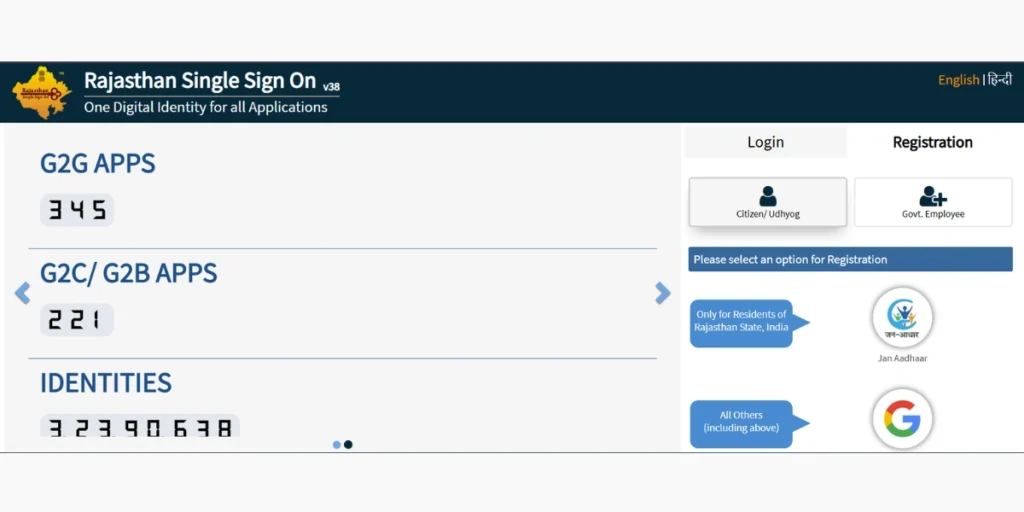
1. Visit the Official Website – Open the official Rajasthan SSO portal at https://sso.rajasthan.gov.in/
2. Create a New Account – Click on the “Register” or “New User” option available on the homepage.
3. Enter Required Information- Provide the necessary details such as
- Name
- Mobile number
- Email address
- Aadhaar number
4. Set Password: Choose a strong and secure password to protect your account.
5. Complete Verification: Proceed with the verification process, which may include methods such as OTP confirmation, Aadhaar authentication, or other identity checks.
6. Complete Registration: After successful verification, your SSO ID account will be created, and the registration process will be finalized.
Eligibility to Criteria for SSO Login
Eligibility for SSO Login Rajasthan
- Citizenship: Applicant must be a resident of Rajasthan.
- Age: Minimum age required is 18 years or above.
- Documents: One of the following is mandatory for registration – Aadhaar Card, Bhamashah Card, Google Account, or Jan Aadhaar Card.
- Contact Information: An active mobile number and email ID are required.
- Proof of Identity: A valid government-issued ID must be provided for verification.
By fulfilling these requirements, citizens can register for an SSO ID and avail themselves of various government services online.
Benefits of SSO ID Rajasthan
Advantages of SSO Portal (Single Sign-On Identity)
- Simplicity: Access multiple government services using just one login ID and password, without the hassle of creating separate accounts.
- Time-Saving: No need to log in repeatedly across different portals, which saves valuable time.
- Security: Protects personal information with strong authentication, ensuring a safe and reliable platform.
- All Services in One Place: Services like e-Mitra, Bhamashah, PHED, and many others can be accessed using a single SSO ID.
- Effective Management: Enables efficient and simplified management of different government services.
- Convenience: Provides all major services on one platform, removing the need to visit multiple websites or offices.
These benefits make the SSO ID Rajasthan an essential tool for residents, enhancing both accessibility and efficiency in availing government services.
| Note: The registration steps and required details may vary slightly depending on the portal version or recent updates. For the most accurate and latest instructions, always visit the official SSO ID Rajasthan. |
By completing these steps, you can easily register for your SSO ID Rajasthan account and begin accessing a wide range of government services online.
How to Login to SSO ID Rajasthan Portal?
Simple and easy process for SSO ID Login Rajasthan account, follow these steps:
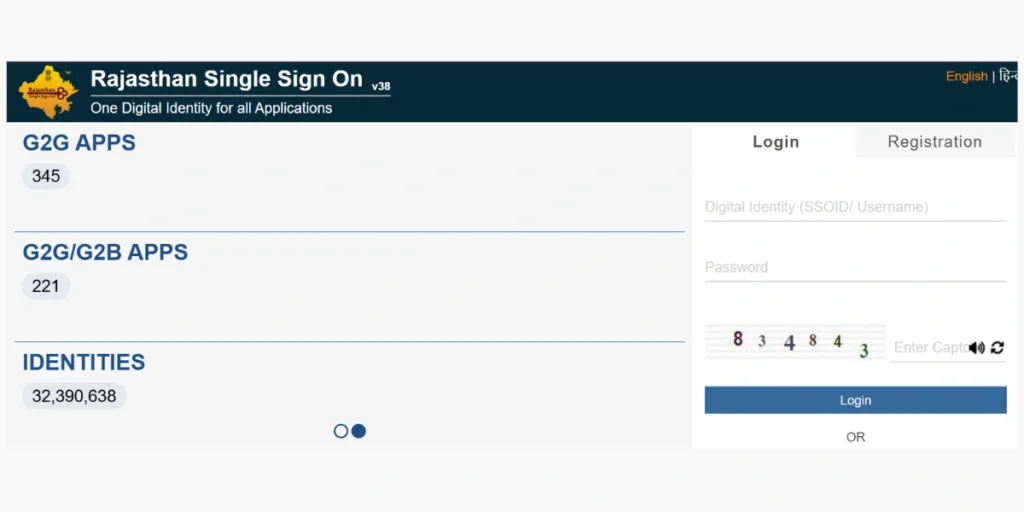
- Visit the Official Portal: Open the SSO ID Rajasthan website at sso.rajasthan.gov.in
- Enter Your Credentials: In the login section, provide your registered username (mobile number, email address, or SSO ID) along with your password.
- Click on “SSO Login”: After entering the details, press the Login button.
- Access Your Account: If the information is correct, you will be successfully logged in and can access your personalized SSO ID Rajasthan dashboard.
| Note: If you forget your password, you can use the “Forgot Password” option on the portal to reset it through a link or OTP. |
For any login-related queries or issues with the SSO ID Rajasthan, it’s recommended to reach out to the official support channels listed on the portal for assistance.
How to Update JanAadhaar ID Number in SSO ID?
To link or update your Jan Aadhaar ID number in your SSO ID account, follow these steps:
- Log in to Your SSO ID Account: Visit the Rajasthan SSO portal and sign in with your registered credentials.
- Go to Profile Settings: Open the “Profile” or “Settings” section from your dashboard.
- Find Jan Aadhaar Section: Locate the field related to Jan Aadhaar or Aadhaar details.
- Enter JanAadhaar ID Information: Type your correct Jan Aadhaar ID number in the designated box.
- Save Changes: Click “Save” or “Update” to successfully apply the changes to your profile.
Additional Tips
- Follow Instructions Carefully: The exact steps may vary slightly depending on the SSO platform version. Always check the portal’s help section or guidelines for accurate directions.
- Seek Support if Needed: If you face difficulties or cannot find the update option, contact the official SSO support team for assistance.
Important Notes
- Verify Information: Double-check that the Jan Aadhaar ID you enter is correct to prevent future issues with your account.
- Stay Secure: Be aware of phishing attempts and ensure you only update details through the official Rajasthan SSO website.
SSO ID Contact Number
| Details | Information |
| Helpline Number | 1800 180 6565 |
| Official Website | Visit |
FAQ’s- SSO ID Rajasthan
What is SSO Rajasthan?
SSO ID Rajasthan is a single login portal providing access to multiple government services and applications for citizens employees online.
How can I register for SSO ID Rajasthan?
You can register online by visiting https://sso.rajasthan.gov.in and selecting the registration option. You can sign up using Jan Aadhaar, Bhamashah ID, Google account, or Facebook account.
What services are available through SSO ID Rajasthan?
Through SSO Portal , users can access various state government services such as e-Mitra, Bhamashah, Rajasthan Employment, Scholarship portals, Business Registration, and many more online facilities.
Is SSO ID Rajasthan free to use?
Yes, creating and using an SSO ID on the Rajasthan government portal is completely free for all citizens, businesses, and government employees.
How can I recover my SSO ID password if I forget it?
On the login page, click on the “Forgot Password” option. You can reset your password using your registered mobile number, email ID, or Aadhaar/Jan Aadhaar details.